AI Interior Design for Home Office Setup
AI interior design for home office setup lets you test layouts, colors and furniture before you buy anything. You can start from a blank plan or from a photo of your actual room, and get a moodboard, a 2D floor plan and a shopping list in one workflow.
Why plan a home office before you buy furniture
A home office is a small space with a lot of jobs: focused work, video calls, storage, and sometimes a corner for printing or a second monitor. Buying a desk and chair first often leads to a room that works poorly, because the desk blocks a window, the cable run is awkward, or the chair does not fit the space behind the door.
An AI design tool helps you test these choices on paper first. You can compare two or three directions, adjust them quickly, and only then commit to a purchase list.
Before you start: gather the basics
Spend ten minutes writing down the facts that shape the layout. Good inputs make better designs.
- Room dimensions: width, depth and ceiling height, measured to the nearest centimeter or inch.
- Openings: doors, windows, radiators, sockets and where any internet point sits.
- Daily use: how many hours you work there, whether you take video calls, and whether others share the room.
- Style preference: three words, for example "calm, warm, minimal" or "bright, plants, wood".
- Must-haves: a standing desk, a bookshelf, a filing cabinet, a printer, or a sofa for breaks.
Tip: Take a photo of the room from the doorway and from the desk position. Photos help the design match the real light and proportions.
Step 1: Choose a starting point
There are two practical ways to begin:
| Starting point | Best when | What you get |
|---|---|---|
| From scratch | You have measurements but no photo, or you want to explore freely | A moodboard, a floor plan and a decor list based on your brief |
| From a photo | You want the design to reflect your real walls and light | A design built around the existing room, with suggested changes |
Either way, the output is a design and a plan, not a photo-realistic render. That is useful for decisions: you see proportions, zones and colors clearly.
Step 2: Build a moodboard for the mood you want
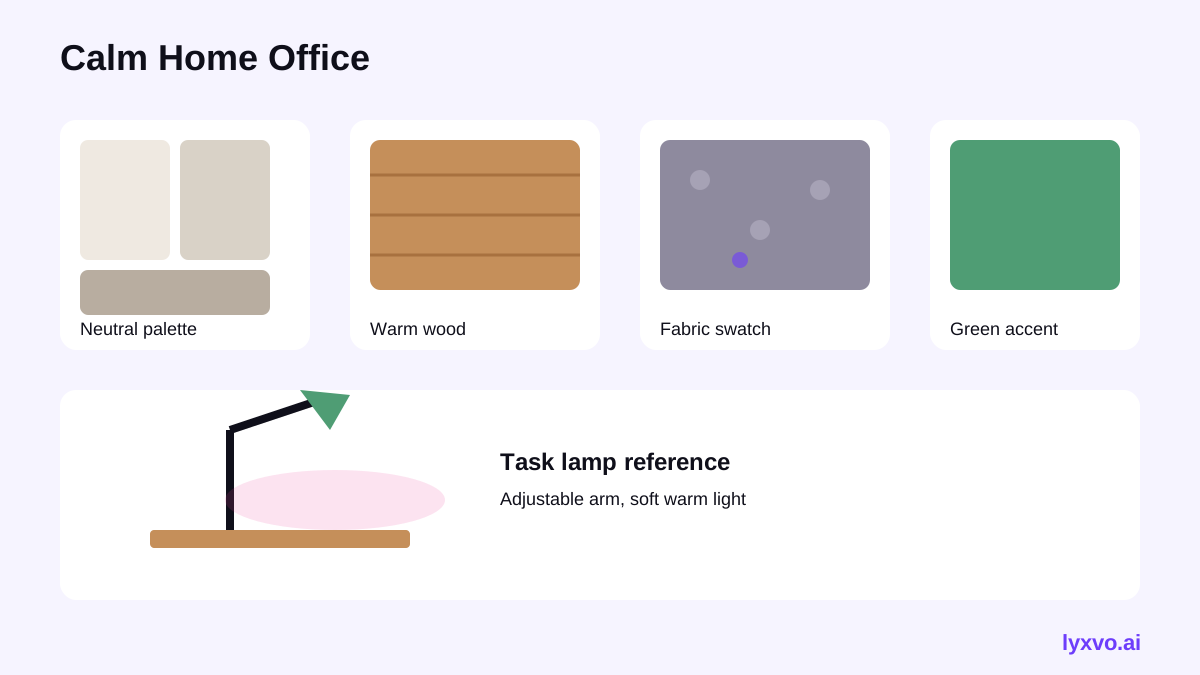
A moodboard fixes the look before you look at individual products. Give the design brief a clear direction: a palette of two or three main colors, one accent, two or three materials (for example oak, linen and matte black metal), and a lighting feel (warm, cool or natural).
For a home office, a common and effective palette is a neutral base such as warm white or greige, one deep tone like green-gray or navy for focus, and a small amount of warm wood for comfort. Keep the accent for one or two items, such as a lamp or a pinboard, so the room stays calm during long workdays.
Step 3: Plan the floor plan around the work zones
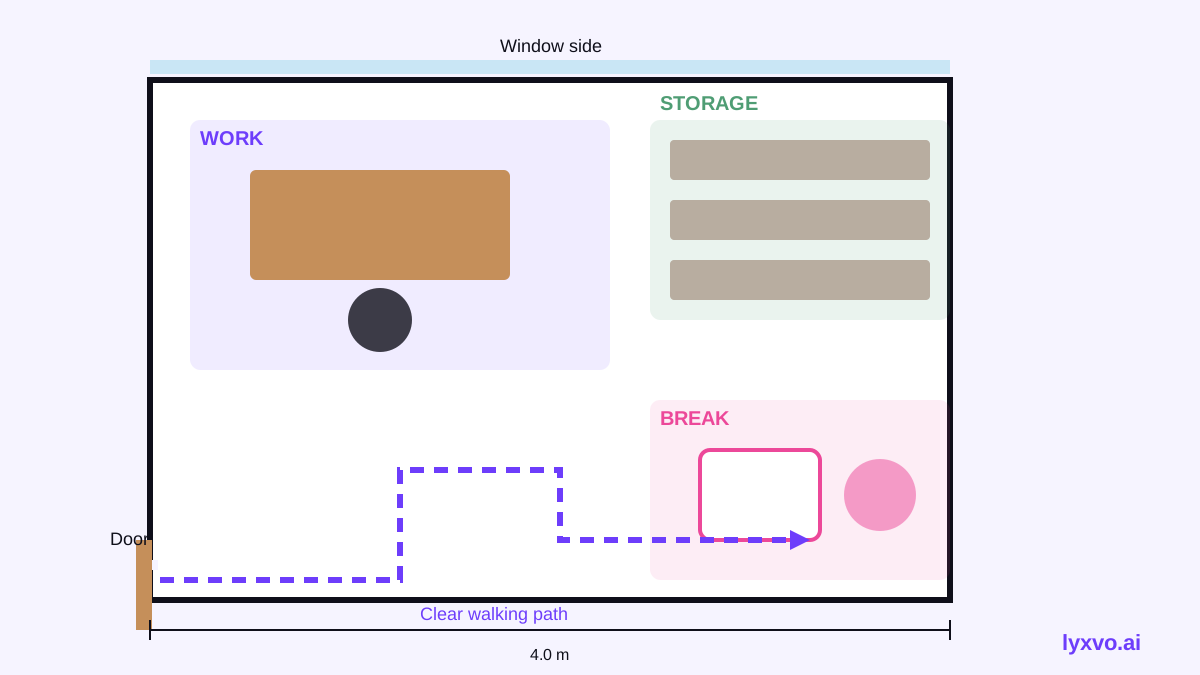
A good layout separates the room into zones. Most home offices need three:
- Work zone: the desk, with the chair pulled out without hitting a wall, and the screen facing away from direct glare from windows.
- Storage zone: shelves or a cabinet within arm's reach of the desk, so you are not standing up for every file.
- Break zone: a corner, chair or plant area where you can reset, even if it is only a few square meters.
Placement checklist
- Keep at least about 90 cm (around 36 in) of clear space behind the chair so you can move freely.
- Place the desk so natural light comes from the side, not from behind the screen or straight into your eyes.
- Run power and network cables along one wall or under the desk, away from foot traffic.
- Leave a clear path to the door and to any window you need to open.
In a 2D floor plan, you can move the desk, shelf and chair in minutes and see which version gives the clearest walking path.
Step 4: Turn the design into a decor shopping list
Once the layout works, convert it into a list. Group items by function so you buy in the right order:
- Essentials: desk, chair, monitor arm or stand, power strip, cable management
- Lighting: a main ceiling light plus a task lamp that does not glare on the screen
- Storage: shelf, drawer unit, or a cabinet sized to the measured wall
- Comfort and style: rug, plant, wall art, pinboard, a small accent chair
Write the dimensions next to each item. Furniture that matches the measured space is the most common source of regret in small rooms.
Step 5: Check the result against your daily routine
Before you buy, walk through a normal workday in your head or on the plan:
- Can you sit down and stand up without moving other furniture?
- Can you reach your most-used items without leaning?
- Is the video-call background tidy from the camera angle?
- Can you open the window and door fully?
If any answer is no, adjust the plan and re-check. Small changes at this stage cost nothing.
How to do it in Lyxvo AI
Lyxvo AI's interior design tool works in these steps. You can see the full workflow on the AI interior design page.
- Open the interior design option and choose from scratch or from a photo of your room.
- Enter your measurements, daily-use notes, style words and must-have items.
- Review the generated room moodboard, then adjust the palette and materials you like.
- Check the 2D floor plan and move zones until the desk, storage and break area work together.
- Export the decor shopping list and use it to compare products.
If you also need a presentation for a client or a team, you can build slides in the AI presentation maker. For more visual planning tools, browse the free design templates.
Note: Interior outputs are designs and plans, not photo renders. Confirm exact product dimensions with the seller before you buy.
Common mistakes to avoid
- Buying the desk first. Plan the layout, then choose the desk size that fits it.
- Ignoring the light. A monitor facing a window causes glare; a desk behind you can cast shadows on the keyboard.
- Too many accent colors. Keep the palette small so the room stays focused.
- No storage plan. Clutter is the usual reason a home office stops feeling like a workspace.
- Forgetting the chair's footprint. Measure how far the chair moves when you stand up.
Quick summary
AI interior design for home office setup works best when you give it real measurements, a clear daily routine and a short style brief. Build a moodboard, test the layout in a floor plan, then turn the result into a decor list sized to your room. Start with the zones, check the daily routine, and buy only after the plan works.
Try it in Lyxvo AI
Describe it in your own words and the design agent starts on the right flow. Free to start.
Related tool: AI interior design for any room