AI Menu for Ice Cream Parlor Seasonal Flavors: A Practical Guide

An AI menu for ice cream parlor seasonal flavors lets you refresh your board every few weeks without rebuilding the design from scratch. This guide shows you how to plan the layout, write flavor names that sell, and produce print-ready menus and digital versions for your shop.
Why seasonal flavors need a menu system, not a one-off design
A seasonal flavor rotation changes what customers see every few weeks. Pumpkin spice in autumn, mango and coconut in summer, peppermint at the end of the year. If every change means redesigning the whole menu, you either fall behind or let the board look tired.
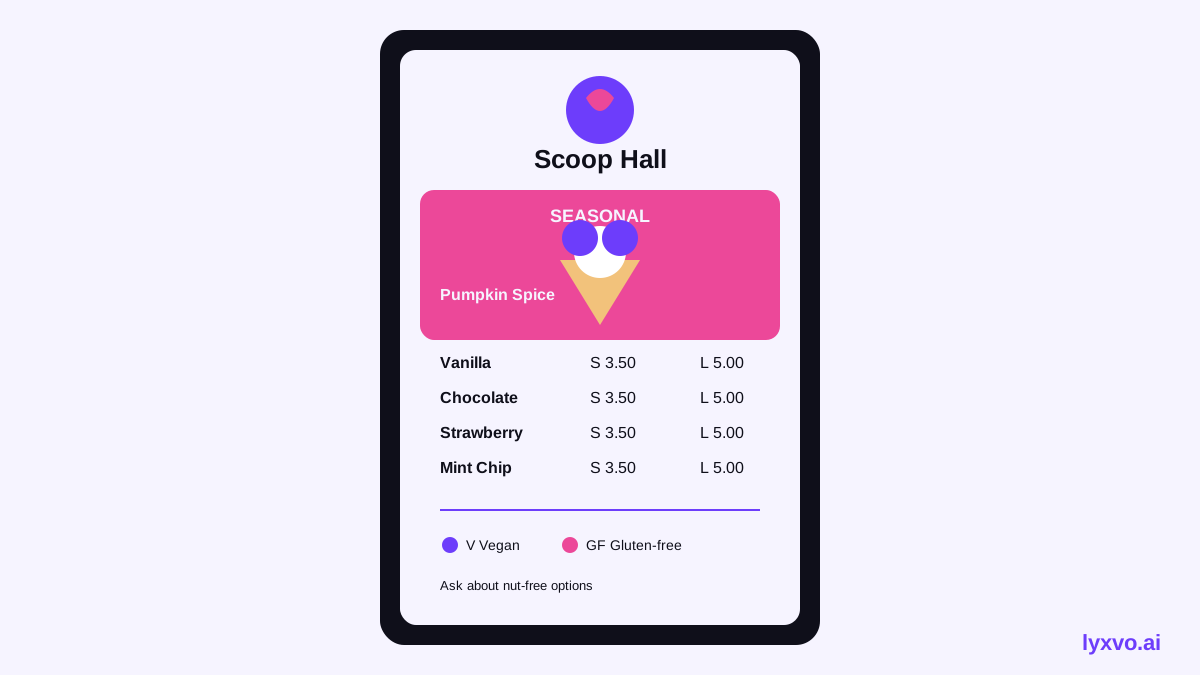
The better approach is a menu system: one fixed structure (header, base flavors, layout grid, prices, allergen note) and a swappable seasonal block. When you change the seasonal flavors, you only touch that block. The rest stays consistent, so your brand stays recognizable.
Plan the structure before you design
Before you open any design tool, decide what your menu must always contain:
- Permanent flavors: the 6 to 10 classics your regulars expect, such as vanilla, chocolate, and strawberry.
- Seasonal block: 3 to 5 limited flavors, clearly labeled with a season tag or a "limited" badge.
- Format and sizes: cone, cup, waffle cone, milkshake, or sundae, with prices per size.
- Dietary info: dairy-free, vegan, nut-containing, or gluten-free markers. Keep a short legend at the bottom.
- Brand block: logo, shop name, opening hours, and social handles.
Tip: Put seasonal flavors in a visually distinct but connected block. A colored band or a small illustration helps customers spot what is new without making the classics feel less important.
Write flavor names that make people want a scoop
Flavor names do much of the selling. Compare a plain description with a clearer one:
| Plain name | Stronger name with a description |
|---|---|
| Pumpkin | Brown Butter Pumpkin: roasted squash, toasted pecan crumble |
| Mango | Alphonso Mango Sorbet: bright, fresh, dairy-free |
| Mint | Peppermint Bark: dark chocolate flakes, cool finish |
Keep each description to one short line. Mention the key ingredient, one texture or contrast, and a dietary marker if it applies. Avoid claims you cannot back up, such as "award-winning" or "all natural", unless they are true for your shop.
Design the layout for quick reading
Customers scan a board for about a few seconds. Make the hierarchy obvious:
- Shop name and logo at the top.
- Seasonal block near the top or in a highlighted panel, since it is the reason people look twice.
- Classics in a clean list below.
- Sizes and prices in a consistent column so comparison is easy.
- Allergen and dietary legend at the bottom in smaller type.
Use two or three colors at most, one font family with two weights, and generous spacing between items. Photos are optional; if you use one, one hero photo of your best seasonal flavor is usually enough.
Print sizes and digital versions
A counter or wall menu needs print-ready files. Common setups:
- Wall or counter board: A3 or larger, at 300 dpi, sized to match your display frame.
- Table tent or handout: A5 or A6, for seasonal promotions at the register.
- Digital screen or social post: a vertical format for a menu screen, and a square or 4:5 post for Instagram, so the new flavors can be shared.
Keep one master design and export each size from it. That way a flavor name change updates every version consistently.
How to make a seasonal ice cream menu in Lyxvo AI
Lyxvo AI's design agent can plan and produce a menu layout, then you edit the details in the Canva-style editor. A workable process:
- Open the flyer or poster studio. Use the AI flyer maker or the AI poster maker as a starting point for a printed menu, or the AI menu maker if you want a menu-specific layout.
- Describe your menu. Give the agent your shop name, permanent flavors, the seasonal block, price columns, and your brand colors. Ask for a clear hierarchy with the seasonal block highlighted.
- Edit directly. Change flavor names, descriptions, and prices in the editor. Adjust colors and photos by clicking the elements.
- Check the legend. Confirm the dietary markers match what you actually serve.
- Export for print. Export PNG at real size for printing at 300 dpi. Use Magic Resize to adapt the same design to other sizes, such as a social post or a screen layout.
- Translate if needed. If you serve international customers, use the translate feature to produce a second language version and check each translation with a native speaker.
- Reuse next season. Duplicate the file, swap the seasonal block, and export again.
Note: Lyxvo AI produces designs and exports; it does not verify your ingredients or allergen information. Always confirm dietary claims with your own recipes and supplier data before printing.
If you also want a seasonal social announcement, the AI social media post generator can produce a post for each new flavor, and the free design templates page has starting points you can adapt.
A simple seasonal rotation checklist
Use this each time you change flavors:
- [ ] Retire flavors that are out of stock or out of season.
- [ ] Write 3 to 5 new names with one-line descriptions.
- [ ] Confirm prices and sizes.
- [ ] Update the dietary legend.
- [ ] Export print and digital versions from the same master file.
- [ ] Replace the printed board and post the announcement online.
- [ ] Note which flavors sold best so the next rotation is better informed.
Common mistakes to avoid
- Too many seasonal flavors. More than five dilutes the message. Keep the list short.
- Vague names. "Special Flavor of the Week" tells customers nothing. Name the flavor.
- Inconsistent layout. If each new menu looks different, regulars lose the sense that the shop is organized.
- Outdated prices. Check the price column every time, especially after supplier cost changes.
- Low-resolution printing. Blurry menus look cheap. Export at 300 dpi for anything printed.
Ready to plan your next menu?
Start with a simple structure, a short list of seasonal flavors, and one master file you can reuse. Open the AI menu maker to begin, or check pricing to see which Lyxvo AI plan fits how often you update your board.
Try it in Lyxvo AI
Describe it in your own words and the design agent starts on the right flow. Free to start.
Related tool: AI menu maker for restaurants and cafés