How to Make a Storyboard From a Short Film Pitch
A storyboard from a short film pitch turns a few paragraphs of story into a sequence of drawn frames that shows what the audience sees, shot by shot. Done well, it lets you test pacing, camera choices and continuity before anyone books a location or a crew.
Why storyboard from a pitch at all?
A pitch tells people what the film is about. A storyboard shows them how it will look. Storyboards have been used this way since the early 1930s, when animation studios began sketching sequences in order so directors could pre-visualize motion before shooting or animating. The same logic applies to a live-action short: you find weak moments on paper, where changes are cheap, instead of on set, where they are expensive.
A storyboard also helps you communicate. Producers, cinematographers and actors read a frame faster than a page of prose, and a sequence of frames makes your visual intent obvious.
Step 1: Break the pitch into beats
Start with the pitch text. Mark each dramatic change, reveal or emotional turn as a beat. A three-minute short often has between 8 and 20 beats. Write each one as a single sentence: "Maya finds the letter," "The phone rings, she hides it," "Final image: an empty chair."
Tip: if a beat needs two sentences to explain, it probably needs two shots.
Step 2: Choose shots for each beat
For every beat, decide how it is shown. The most common shot types are:
| Shot | Typical use |
|---|---|
| Wide / establishing | Sets the place and who is in it |
| Medium | Conversation and action |
| Close-up | Emotion, reaction, a clue |
| Insert | A detail: a hand, an object, a screen |
| Over-the-shoulder | Dialogue between two people |
| POV | Shows what a character sees |
Add a movement note where needed: static, pan, dolly in, handheld. Keep a short description of the action and the dialogue line beside each frame so the board can be read alone.
Step 3: Lay out the frames
A practical layout is a grid of 6 to 9 frames per page, each with:
- A sketch or image of the framing
- Shot number and shot type
- One line of action
- Dialogue or sound cue
- Duration estimate
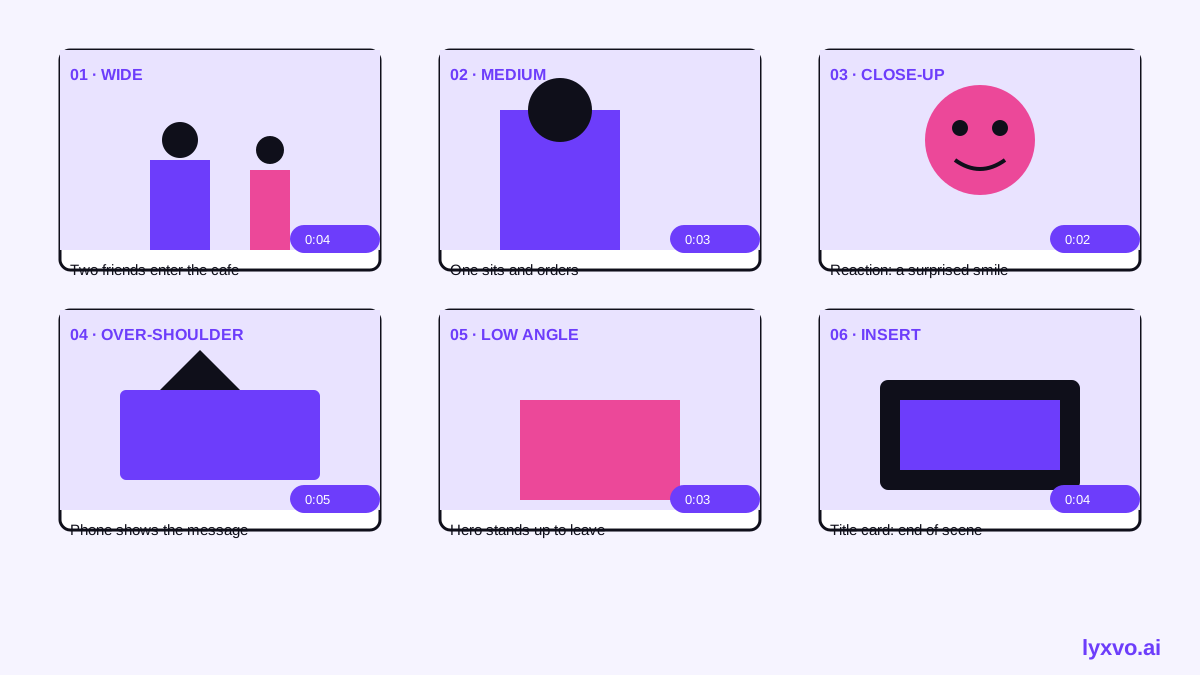
Duration estimates matter. Add them up per scene and compare to your target runtime. If a short that should run four minutes storyboards to nine, cut or merge beats now.
Step 4: Check continuity and flow
Go through the board in order and check:
- Screen direction: if a character faces right in one frame, keep them moving or facing the same way in the next unless you intend a change.
- 180-degree rule: keep the camera on one side of a conversation so the two people stay consistent.
- Eyelines: a character looking off-frame should be answered by a shot of what they see.
- Pacing: alternate wide and close shots so the rhythm does not feel flat.
- Ending: the final frame should land the pitch's central image or question.
Step 5: Test it with a reader
Show the board to someone who has not read the pitch. Ask them to say in one sentence what happens and who the main character is. If they cannot, the board needs clearer key frames or more readable shots.
How to build it in Lyxvo AI
Lyxvo AI includes a design agent that works on visual layouts, which you can use to draft a frame-based board. A workable process:
- Open the Lyxvo AI design studio and start a slide-format canvas, which gives you a sequence of panels you can reorder.
- Paste your beats as the prompt and ask for one panel per shot, with the shot type, action line and dialogue as text on each panel.
- Use the Canva-style editor to edit text, swap images and adjust colors directly on each panel.
- Use real-time collaboration to share the board with your director or producer for notes.
- Export as PNG at real size for printing, or as a PDF-style set of pages for the pitch deck.
For a deeper look at the tool, see the AI storyboard generator. If the board will open a pitch presentation, the AI presentation maker can turn the frames into slides.
Note: Lyxvo AI helps you lay out and draft visual sequences. Final framing, camera choices and performances are still decided by your creative team.
Common mistakes to avoid
- Drawing every frame of the film. Storyboard the key shots, not every second.
- Ignoring sound. Note dialogue, music and effects beside the frames.
- Overly detailed art. Stick-figure quality is fine if the framing and action are clear.
- No durations. Without timing, the board cannot predict runtime.
- Skipping the test read. A confused reader is the fastest signal that a sequence needs work.
A quick checklist before you pitch
- [ ] Every beat from the pitch has at least one frame
- [ ] Each frame has shot type, action and dialogue
- [ ] Screen direction and eyelines are consistent
- [ ] Estimated runtime matches the target
- [ ] The opening and ending frames are strong
- [ ] A reader can summarize the story from the board alone
Once the board works, you can also design the poster or flyer for festival screenings and a YouTube thumbnail using the same visual style.
Try it in Lyxvo AI
Describe it in your own words and the design agent starts on the right flow. Free to start.
Related tool: AI storyboard generator for ads and short videos